

infometry_logoInfometry Logoinfometry_logoinfometry_logo
  • Products
    • Informatica Cloud Connectors
      • Google (GCP) Connectors
        • Google Sheets Connector
        • Google Drive Connector
        • Google Pub/Sub
        • Google BigTable Connector
        • Google Ads Connector
      • Global Connectors
        • HubSpot Connector
        • Adaptive Insights
    • Infofiscus Analytics
      • Sales Analytics Snowflake Native App
      • Finance Analytics
      • Sales & Marketing Analytics
      • Supply Chain Analytics
      • Marketo Data Replication
      • DDL Automation
  • Solutions
    • Snowflake Solutions
    • PC to Cloud Migration
    • Data Architecture and Strategy
    • Data Analytics
      • OEM Analytics
      • Advanced Analytics Service
      • EPM
    • Data Management
      • Data Warehouse
      • Cloud Data Orchestration
      • Data Quality & Enrichment
      • Enterprise Metadata Management
      • Master Data Management Page
    • BI and Visualization
      • BI Solutions
    • MuleSoft ESB
    • Matillion ETL
  • Company
    • About Us
      • Customers – Partners
        • careers
    • Testimonials
  • Resources
    • Blog
      • Salesforce
      • Analytics Solutions
      • IDMC Connector
      • Cloud Data Integration
      • Powercenter
      • Snowflake
      • MuleSoft
      • Matillion
      • Power BI
      • Tableau
      • MDM
      • Java Transformation
      • RPA
      • DDL
    • Case Studies
    • Gallery
    • Webinar
    • Press Releases
  • Industry
    • Hi-Tech
    • Retail
    • Finance
    • Manufacturing and Supply Chain
    • Life Sciences and Pharmaceutical Solutions
    • Solar and Energy
    • Healthcare
  • Contact
✕

Excel to CSV using SFTP In IICS

Blog, Java Transformation
Excel to CSV, IICS, Informatica, Java, java transformation, SFTP, SFTP download
How To Case Comments in Case Object Without The Public Checkbox in Salesforce?
January 21, 2019
CSV Splitting In Informatica cloud platform (IICS)
February 18, 2019

Problem Description

Convert Excel to CSV  Customers/Users face issues with loading Excel files from SFTP remote server to local machine and convert the excel file to CSV file in mapping on IICS.

Challenges to User/Developer

  • In IICS, the above-mentioned problem can be solved through Java Transformation.
  • The Excel file needs to be transferred to the local machine (where the security agent is installed).
  • The locally available Excel file needs to be converted to a CSV file.
  • Move the original Excel file which we got from SFTP remote server to another location.

Solution: 

Approach –

Excel to CSV using SFTP In Informatica Intelligent Cloud Services (IICS)

Convert Using Java Transformation, we can achieve the solution for the above-mentioned challenges.

Java transformation is used to add custom integration logic into mappings using a built-in developer-friendly editor or by plugging in custom JAR files.

 Technical Solution –

  • Develop Java code that performs Excel files transfer from SFTP to Local machine and converts Excel file to CSV file using IDE (ex. Eclipse)
  • Create an Executable jar file for the above-developed java code.
  • Place the above-created jar file at any directory at the local machine (where the security agent is installed).
  • Copy the above directory path including the jar name with extension.
  • Create the CLASSPATH Environment variable if not available.
  • Paste the above-copied directory to the CLASSPATH Environmental variable.
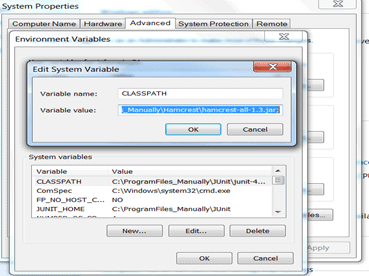
Convert Excel to CSV
  • Restart the secure agent.
  • Create the mapping using source and target with java transformation in between them.

Convert Excel to CSV
  • Edit java transformation to make a call to the specific method of the class available in a jar which is responsible for transferring the file through SFTP to Local machine and converts Excel file to CSV file.
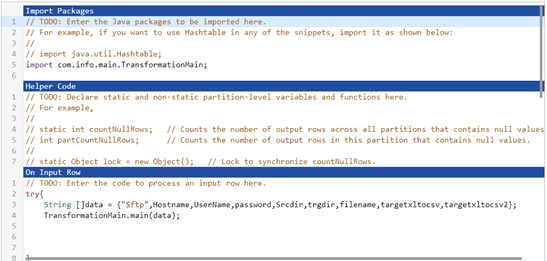
Convert Excel to CSV
  • Compile the above java code, validate the mapping and run.


Advantage –

The file will get a transfer from the SFTP directory to the Local machine directory and convert from an Excel file to a CSV file.

Issues –

None

Conclusion

The excel file will now be transferred to the local machine and will be converted accordingly.


Share
0
Rohan.Omer@infometry.net

Related posts

Exploring Different Types of Data Visualization
August 7, 2023

Exploring Different Types of Data Visualization


Read more
How to Securely Store and Analyze Data?
August 1, 2023

How to Securely Store and Analyze Data?


Read more
PowerCenter Tool
July 28, 2023

How Does PowerCenter Security Protect Your Data and Ensures Compliance?


Read more

Connect with us

Products

  • Google Connectors Product
  • Global Connectors Product
  • Infofiscus Analytics

Resources

  • Blog
  • Case Study
  • Gallery
  • webinar
  • Press Releases

Company

  • Customers – Partners
  • Careers
  • Testimonial
@2023 Infometry Inc, All Rights Reserved