
infometry_logoInfometry Logoinfometry_logoinfometry_logo
  • Products
    • Informatica Cloud Connectors
      • Google (GCP) Connectors
        • Google Sheets Connector
        • Google Drive Connector
        • Google Pub/Sub
        • Google BigTable Connector
        • Google Ads Connector
      • Global Connectors
        • HubSpot Connector
        • Adaptive Insights
    • Infofiscus Analytics
      • Sales Analytics Snowflake Native App
      • Finance Analytics
      • Sales & Marketing Analytics
      • Supply Chain Analytics
      • Marketo Data Replication
      • DDL Automation
  • Solutions
    • Snowflake Solutions
    • PC to Cloud Migration
    • Data Architecture and Strategy
    • Data Analytics
      • OEM Analytics
      • Advanced Analytics Service
      • EPM
    • Data Management
      • Data Warehouse
      • Cloud Data Orchestration
      • Data Quality & Enrichment
      • Enterprise Metadata Management
      • Master Data Management Page
    • BI and Visualization
      • BI Solutions
    • MuleSoft ESB
    • Matillion ETL
  • Company
    • About Us
      • Customers – Partners
        • careers
    • Testimonials
  • Resources
    • Blog
      • Salesforce
      • Analytics Solutions
      • IDMC Connector
      • Cloud Data Integration
      • Powercenter
      • Snowflake
      • MuleSoft
      • Matillion
      • Power BI
      • Tableau
      • MDM
      • Java Transformation
      • RPA
      • DDL
    • Case Studies
    • Gallery
    • Webinar
    • Press Releases
  • Industry
    • Hi-Tech
    • Retail
    • Finance
    • Manufacturing and Supply Chain
    • Life Sciences and Pharmaceutical Solutions
    • Solar and Energy
    • Healthcare
  • Contact
✕

How to Setup Globally Salesforce Email

Blog, Salesforce
email templates salesforce, email to salesforce, email-to-case, enhanced email salesforce, Global email, Organization-Wide Email, salesforce email to case setup, setup
Searching Picklist, Multi-Picklist, and Date Values from Global Search and List View Search in Salesforce
January 21, 2019
How to create a custom button for salesforce or More Records in a Table Form in Salesforce?
January 21, 2019

Setup Salesforce Email

Problem Description :

Salesforce Users/Customers receive email alerts from salesforce with “noreply@salesforce” in them from address.

Challenges to User/Developer :

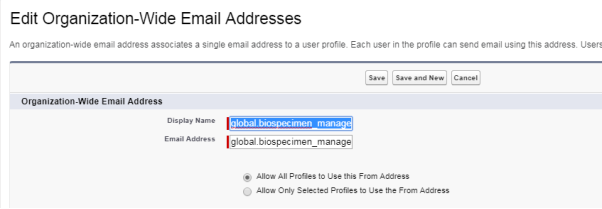
Set the Organization-Wide Email Address.

Solution :

  • Setup and in the quick find box type “Organization-Wide Email Addresses”.
  • Click New.

Advantage :

An email will have the org-wide email address as the from address.

Issues :

None

Conclusion :

Users/Customers receive email alerts from the new Organization-wide address.


Share
0
Rohan.Omer@infometry.net

Related posts

Exploring Different Types of Data Visualization
August 7, 2023

Exploring Different Types of Data Visualization


Read more
How to Securely Store and Analyze Data?
August 1, 2023

How to Securely Store and Analyze Data?


Read more
PowerCenter Tool
July 28, 2023

How Does PowerCenter Security Protect Your Data and Ensures Compliance?


Read more

Connect with us

Products

  • Google Connectors Product
  • Global Connectors Product
  • Infofiscus Analytics

Resources

  • Blog
  • Case Study
  • Gallery
  • webinar
  • Press Releases

Company

  • Customers – Partners
  • Careers
  • Testimonial
@2023 Infometry Inc, All Rights Reserved